

How to choose a carrier compliance tool for your freight brokerage

Vetting carriers gets easier
with Carrier Hub
Build a compliance process that holds up under pressure
A lot of brokers pick a compliance tool the same way they pick most software. They skim a feature list, read a blog post ranking the top options, and go with whatever looks good on paper. That works fine until something goes wrong.
This article gives freight brokers a checklist for evaluating carrier compliance software before committing. It covers what a compliance tool is actually supposed to do, how to identify meaningful automation versus surface-level automation, and the specific questions worth asking any vendor.
What a carrier compliance tool is actually supposed to do
A carrier compliance tool does two jobs: it checks a carrier’s credentials and it monitors those credentials over time. That means operating authority, insurance currency, safety records, and identity. Understanding carrier compliance as a function is the prerequisite to evaluating any tool built to support it.
It helps to separate two things that often get bundled together. Onboarding tools collect carrier packets, W-9s, and signed agreements. They handle the administrative setup of a new carrier relationship. A compliance tool focuses on the carrier’s standing: checking credentials at the point of booking and surfacing changes after it. The two are related, but not every platform covers both equally well.
Some platforms handle the point-of-booking check only. Others combine onboarding and ongoing monitoring in one workflow. Knowing which you need, and whether the tool you are evaluating actually covers both, is the first question worth asking. A platform that handles paperwork well but has thin monitoring built on top of it leaves the more consequential gap open.
One-time checks vs. ongoing monitoring: know which you are buying
Compliance tools split into two types: a one-time check at onboarding and ongoing monitoring after it. The question is which one you are buying, and whether that matches what your brokerage needs.
A one-time check runs at onboarding. The tool checks a carrier at the moment they are added and creates a record of authority, insurance, and identity. For the point of booking, that is the right tool: a clean read before you cover the load.
What a one-time check does not do is tell you when something changes afterward. A carrier who passes today may have a lapsed insurance policy in 60 days, a suspended authority in 90 days, or a declining safety profile by the next time you book them.
Ongoing monitoring tracks the carrier network over time and alerts you when credentials change. Good monitoring should cover insurance policy changes, authority revocations, safety score changes, and out-of-service orders. Monitoring answers a different question than the booking-day check: whether anything has changed since.
When you evaluate a platform, ask the vendor whether the tool runs a one-time check, ongoing monitoring, or both. Plenty of brokers want both: a solid read at booking and a way to catch changes on carriers they run regularly. The trouble starts when a broker buys a one-time check expecting it to flag problems that surface later, since that is the job of monitoring.
Insurance monitoring in particular needs to be continuous. A certificate that looks valid at setup can expire or get cancelled mid-relationship.
What data should a carrier compliance tool pull from
A compliance tool is only as good as the data behind it. At a minimum, expect coverage of FMCSA for authority status and safety data, insurance certificate databases, and identity checks against carrier records. If a vendor cannot tell you specifically where their data comes from, that is an answer in itself.
Push on refresh frequency too. The lag between a change at FMCSA and when it shows up in the tool matters. A carrier whose authority is revoked on a Tuesday should not still be bookable in your workflow on Wednesday without a flag.
Ask vendors how often data is updated and what the typical lag is between a source change and an alert. That refresh cadence is what separates compliance software that helps you manage real risk from software that just builds a paper trail.
CSA scores are one data point worth confirming the tool covers. CSA scores show how a carrier performs across safety measurement categories. Treat them as one useful input in a fuller picture of a carrier, not a single pass or fail verdict.
Identity has become a bigger part of the data stack as carrier fraud has grown. Impersonation schemes and double brokering both exploit gaps in identity checks. A tool that checks authority status but does not help confirm the carrier hauling the load is the one on record leaves a common and growing exposure open.
What counts as real compliance automation
Compliance software vendors tend to describe their platform as automated. That word is doing a lot of work, and brokers often do not probe it enough.
Collecting a carrier packet automatically is not the same as compliance automation. Neither is sending an onboarding email on a schedule. Real compliance automation means the system surfaces a policy change or lapse and routes an alert before anyone has to log in and look.
In a compliance context, automation means the system is watching for a defined event and taking a set action when a threshold is crossed, without a person having to start the check by hand.
Ask vendors these specific questions:
- What triggers an alert?
- Who receives the alert, and how?
- What does the system do automatically when an alert fires versus what requires manual follow-up?
- What happens if a monitored carrier’s authority is revoked while a load is in transit?
The answers tell you whether you are buying real monitoring or a workflow wrapper around a manual process. Brokers who lean on manual processes to manage risk often do not see how much slips through until a carrier event surfaces it the hard way.
Integration with your load board and TMS
A compliance tool that lives outside your load board or TMS adds friction. For high-volume brokers especially, that friction turns into compliance steps that get skipped when the phone is ringing and there are loads to cover.
Compliance software works better when it connects to the systems your team already uses than when it sits behind a separate login. A check the team has to leave their workflow to run is a check that gets skipped on a busy day.
Compliance checks need to happen inside the workflow, not in a separate tab, a separate login, or a step that means switching systems. Ask every vendor whether the tool connects with your load board and your TMS. A single sign-on link is not the same as data moving between systems. What matters is whether a compliance flag can stop or delay a booking inside the system where the booking actually happens.
If a vendor’s answer to the integration question is “you can export a CSV,” that is not integration. That is a manual process with extra steps.
Questions to ask before you commit
Before signing with any compliance software provider, run through this list.
- What data sources does the tool pull from, and how often is that data refreshed?
- Does it run a one-time check or continuous monitoring?
- What does an alert look like, and who receives it?
- Can custom compliance thresholds or business rules be set?
- Does it integrate with my load board and TMS?
- How long does setup take, and what does onboarding support look like?
- How does the tool handle carriers not yet in its database?
- What does pricing look like as my carrier network grows?
How Truckstop.com compliance tools compare
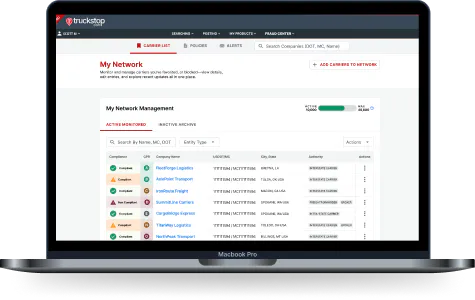
Carrier Hub is Truckstop’s carrier compliance product for freight brokers, available in two tiers: Basic and Advanced.
Several compliance tools are on the market, and the basic checks are fairly standard across them. What varies is monitoring depth, data freshness, integration, and whether the tool was built for brokers or adapted from a broader use case.
The table below runs the criteria from this article across three scenarios: handling compliance by hand, and using either tier of Carrier Hub.
| Feature | Manual process | Carrier Hub Basic | Carrier Hub Advanced |
|---|---|---|---|
| Pre-booking authority check | Manual FMCSA lookup | Yes | Yes |
| Insurance verification | Manual | Yes | Yes |
| Carrier identity verification | Manual | Yes | Yes |
| CPR crowd-sourced ratings | No | Yes | Yes |
| 360-degree carrier profile | No | Yes | Yes |
| Continuous monitoring | No | No | Yes |
| Insurance lapse alerts | No | No | Yes |
| Authority revocation alerts | No | No | Yes |
| Compliance assessment tools | No | No | Yes |
| Custom business rules | No | No | Yes |
Two features stand out in the Carrier Hub columns: CPR crowd-sourced ratings and native load board integration. CPR ratings aggregate peer-sourced feedback on carrier performance, giving brokers a data layer beyond the standard authority and insurance checks. Native integration means compliance checks happen inside the Truckstop load board workflow, rather than in a separate tool the team has to open on its own.
Choosing between Carrier Hub Basic and Carrier Hub Advanced
The right tier depends on where your brokerage is. Basic gives you a clean read at the point of booking, which closes the immediate gap for a team that has been running these checks by hand or across disconnected tools.
Advanced adds ongoing monitoring of the carriers you already run. A growing operation hits the limits of a booking-day check faster than expected, usually the first time a carrier’s insurance lapses weeks after a clean onboarding. Advanced is built for the broker who wants notice when a carrier’s status changes, rather than learning about it from a claim.
Build a compliance process that holds up under pressure
Choosing a carrier evaluation tool comes down to three things: how deep the data goes, whether the checks run once or keep running, and how well the tool fits the workflow where booking actually happens. Knowing what to ask before you buy is what keeps a carrier problem from catching you off guard.
Run the criteria from this article against whatever platform you use now. If it falls short on more than two questions from the checklist, the process is worth a second look. Carrier Hub was built to cover these criteria for brokers, from the booking-day check in Basic to ongoing monitoring in Advanced.
Frequently Asked Questions




Get helpful content delivered to your inbox.
Check before you book
Authority, insurance, and safety in one place. Make more informed decisions.





.png)

.png)

