

Freight bill audit: what to check before an error costs you

Stop chasing invoices.
Access your capital in 24-48 hours and keep freight moving.
The load delivered on time. The carrier sent an invoice, the POD came through, and the rate confirmation is somewhere in the email thread. Then the numbers do not line up, and the invoice headed to the shipper is already wrong.
That mismatch between the paperwork and the payment is where brokerages can lose money and trust. A wrong invoice slows your cash, forces rework, and gives a shipper a reason to wonder how the rest of your operation runs.
Where freight invoices and documents go wrong
The errors here are ordinary mistakes. They come from handoffs under time pressure, when three documents must agree and one of them does not.
A few errors show up again and again:
- Wrong billing details, like a mismatched company name, address, or account number
- Duplicate or skipped invoices during busy weeks
- A missing POD, or a rate confirmation attached to the wrong load
- Data entered by hand that does not match the source document
None of these look serious on their own. Over a month of loads, they add up into real dollars and real disputes.
What one bad invoice actually costs
Say an invoice goes out for $3,500 when the load booked at $5,300. A single transposed number leaves $1,800 on the table, and it may sit unnoticed until a shipper flags it or a carrier calls asking where the rest of their money is.
The correction is not free either. According to the Institute of Finance and Management’s 2025 benchmarks, about 22% of freight invoices contain an error, and each one costs an average of $53.50 to fix. Multiply that across your monthly volume and the back-office drag adds up.
A wrong invoice also delays the money itself. In the broker billing process, the cash you are owed commonly sits behind net 30 to net 60 shipper terms, so an invoice that bounces back for a fix pushes that payment out even further.
Then there is the relationship cost. Asking a shipper for more money because your invoice came in short can read as sloppy. Do it more than once and a shipper may start questioning whether you can handle more freight.
What a freight bill audit covers
A freight bill audit is a review of the documents behind a load before the invoice goes out. The point is to confirm the charge matches what was agreed and what actually happened.
A typical review checks a few things:
- The billed amount against the rate confirmation
- The POD against the load details
- Accessorials against what was authorized
- Any charge that shows up without a matching document
Accessorials are a common dispute point, since a detention or liftgate fee that nobody agreed to before dispatch can turn into an argument after delivery.
There is no single standard for what an audit must include. What you check, how closely, and how often are decisions for your brokerage. Treat this as a starting point, not a rulebook.
Manual review versus automated checks
Done by hand, a freight audit is thorough but slow, and it gets slower as volume climbs. Manual data entry alone carries an error rate of roughly 2% on standard invoices, per that same 2025 IOFM data, and freight paperwork tends to run higher because carrier formats vary so much.
An automated check does the first pass instead. AI-assisted broker workflows read the uploaded documents, check them against the job details, and flag what does not match, so a person spends time on the exceptions rather than on every line.
How Document Audit speeds up the review
Matching a carrier invoice, a POD, and a rate confirmation against the job by hand is the kind of task that eats a back office at volume. Broker Factoring from Truckstop Financial takes that on, running the check as part of getting a load funded rather than as a separate step, with invoicing and collections in the same system.
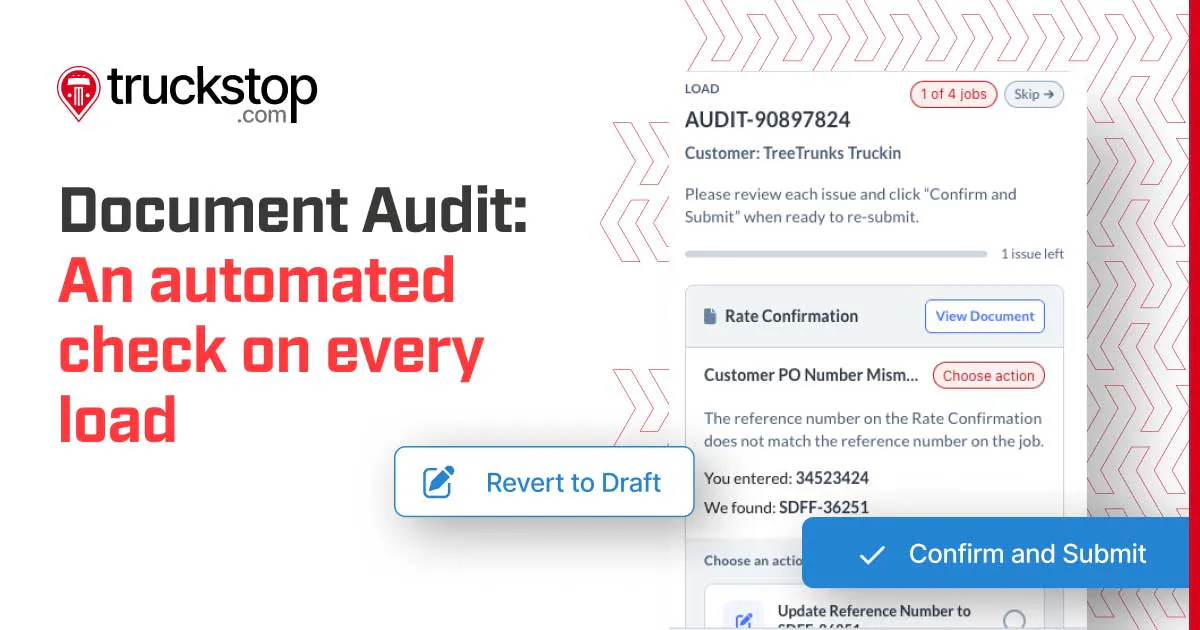
When you submit a load for funding, a feature called Document Audit compares the documents you uploaded against the job details and flags anything that does not match, like a wrong amount, a missing document, or a name or reference number that is off. From there, it shows you what to correct and lets you fix it right in the app.
The check itself is fast. Based on Truckstop platform data, 71% of document audits finish in 30 seconds or less, and 91% finish in under a minute. That gets your job submitted for funding with fewer errors, so it moves ahead faster instead of bouncing back for a correction.
One brokerage, Alliance Logistix, reported cutting invoice processing time by 62% and saving 166 hours a month on back-office work, though results vary by operation. Freight broker factoring is one way brokerages manage the timing between paying carriers and collecting from shippers, and clean, matched documents help keep that funding from getting held up.
Build a cleaner path from paperwork to payment
Billing errors are easy to shrug off one at a time, but they get expensive in aggregate. A consistent review step before the invoice goes out is what keeps a transposed number or a missing POD from turning into a shipper dispute or a payment delay.
Start with your own process and how much of the document matching still happens by hand. Document Audit inside Broker Factoring runs that first pass when you submit a load for funding, flags anything that does not match the job, and shows your team what to fix.
Frequently Asked Questions




Push any load to the top of the carrier search with Load Boost. No reposting, no raising your rate. Pay only when you need it.
Get helpful content delivered to your inbox.
Cover your hardest loads first
Push any load to the top of the carrier search with Load Boost. No reposting, no raising your rate. Pay only when you need it.





.png)

.png)

