
Your one-stop shop for moving freight.
Truckstop Carrier Hub
Check the carrier. Cover the load. Move on.
Carrier Hub brings carrier data, monitoring, and onboarding into your Truckstop workflow so your team decides faster, alongside the checks you already run.
Get a Demo Compare Basic, Advanced, and ProAlready a Truckstop.com customer? Add Carrier Hub to your account.
Stop chasing carrier information across tabs and tools.
Brokers spend real time bouncing between FMCSA, insurance certificates, internal spreadsheets, and a half dozen carrier portals. Carrier Hub brings carrier data, monitoring, and onboarding into one Truckstop workflow, so you make the call faster.
Carrier profile, right in Truckstop.
Authority, insurance, safety, CPR ratings, and community reporting in a carrier profile you open from the Truckstop universal navigation. Advanced and Pro add identity risk signals.
Compliance status before you tender.
Each carrier shows a pass, warning, or fail against your rules with the reasoning included.
Monitoring on your network.
Get alerts when authority changes or a safety score drops. Alerts typically arrive in the morning after FMCSA updates. Advanced and Pro add active insurance monitoring.
Built into the Truckstop workflow.
No separate login. Monitored carriers in your network feed your private load posts on the Load Board.
Onboarding next to monitoring.
With Carrier Hub Pro, set your requirements, send the invite, and track every partner in your network view.
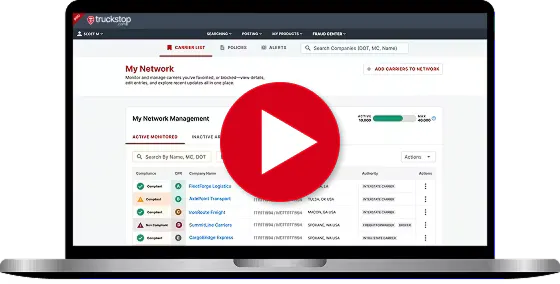
How Carrier Hub Works
From carrier search to a covered load, in fewer steps.
Add your carriers
Search by MC or DOT, paste in a list, or move existing carriers from your archive. Active for daily use. Inactive for the bench.
Set your rules
Define what counts as compliant for your brokerage. Insurance limits, authority age, safety scores, fraud signals, and identity checks. Adjust thresholds. Decide what triggers a warning vs. a hard fail.
See the results
Every carrier is scored against your policy. Pass, warning, or non-compliant, with the reasoning on every flagged rule. No guessing why a carrier got flagged.
Stay ahead of changes
Carrier Hub watches your active network for authority revocations, insurance lapses, contact changes, and fraud signals. You get the alert, review it, and decide how to act.
Onboard the carriers you choose
With Pro, publish your requirements and agreements, invite carriers, and track each partner in your network view. Invited carriers claim a free Company Owned Profile they can reuse with other customers.

Why brokers choose Carrier Hub.
Carrier tools often mean a separate login and a separate workflow. Carrier Hub lives inside Truckstop, so your team checks carriers where they already book loads. It works alongside the checks and sources you already use, with no extra system to manage.
Get a DemoGo deeper than status.
Pull authority history, CPR ratings, community reporting, and insurance certificates from the carrier profile. Drill in when you need to. Move on when you don’t.
Control what counts as compliant.
Set business rules once. Apply them across your full carrier network. Adjust thresholds for insurance, safety, fraud, and identity without waiting on IT.
Get to capacity others can’t see.
Monitored carriers in your network feed private load posts on the Truckstop Load Board. Run a waterfall: your monitored network first, broader network next, public last.
The right Carrier Hub for your program.
Three plans. Start with monitoring, add your own rules, and add onboarding when your program needs it.
Best for: New brokers building their first carrier relationships. Small teams without a formal compliance process.
- Carrier profiles with DOT authority, insurance, and safety data
- CPR ratings & reports (crowd-sourced intelligence)
- COI data access when a certificate is on file*
- Managed carrier list
- DOT data monitoring (active change tracking)
- Unlimited carriers monitored (DOT and COI data access)*
Best for: Brokerages managing active carrier networks where you need to see risk signals early, and where access to private-load capacity is a real competitive advantage.
- Request a missing COI from the carrier
- Insurance monitoring (active policy tracking)
- Ongoing compliance monitoring with self-serve business rules, and alerts typically each morning after FMCSA updates
- Compliance assessment
- Self-serve administration
- 500 monitored carriers included (additional capacity available)
Best for: Brokers running a formal onboarding program who want it next to monitoring.
- Self-service onboarding setup
- Agreement management, so you can publish your agreements to the carriers you invite
- Onboarding invitations to the carriers you choose
- A network view of every partner and their onboarding status
- A free Company Owned Profile for invited carriers, reusable with other customers
*Basic includes unlimited carriers with DOT and COI data access. Active insurance, compliance, and monitoring tools are included in Advanced and Pro.
Bundle Carrier Hub Advanced with Load Board Premium and get the broadest access to private loads on the network, plus full carrier monitoring. From $369/mo.
Talk to sales →FAQs
Automated alerts fire as soon as a qualifying change is detected, typically in the morning when FMCSA updates are processed. They cover DOT company and contact changes, DOT authority status changes, and compliance status changes (Advanced only).
Daily summary alerts send a consolidated digest once a day covering DOT authority changes, safety rating changes, operating status changes, company and contact changes, and compliance status changes (Advanced only).
Get ready to check, monitor, and onboard carriers with Carrier Hub.
Whether you’re moving a handful of loads a day or managing a national carrier network, Carrier Hub brings carrier data, monitoring, and onboarding into your Truckstop workflow. Talk to our team about what your program needs.
Here’s what you’ll see:
- How to build a compliance policy that fits your program
- How authority, insurance, and safety data show up on a carrier profile
- How monitoring alerts you to changes so you can act
- How Pro onboarding works: your requirements, agreements, and invitations
- How Carrier Hub connects to private loads on the Truckstop Load Board
See how Carrier Hub fits the way your team books freight.